eBay January Sale for Charities: Clear Old Stock Before Donation Rush
An eBay January sale for charities does two jobs at once: it turns slow online stock into funds, and it frees space for the wave of unwanted Christmas gifts that arrives in January. Charity sellers on eBay UK have business accounts, so they can use the full toolkit, including eBay sale events, order discounts, coupons, offers to watchers and Promoted Listings. The key is to start in December, because a sale event only picks up listings that haven't been edited for 14 days.
This guide shows charity retail teams how to clear old stock step by step, in a way volunteers can follow.
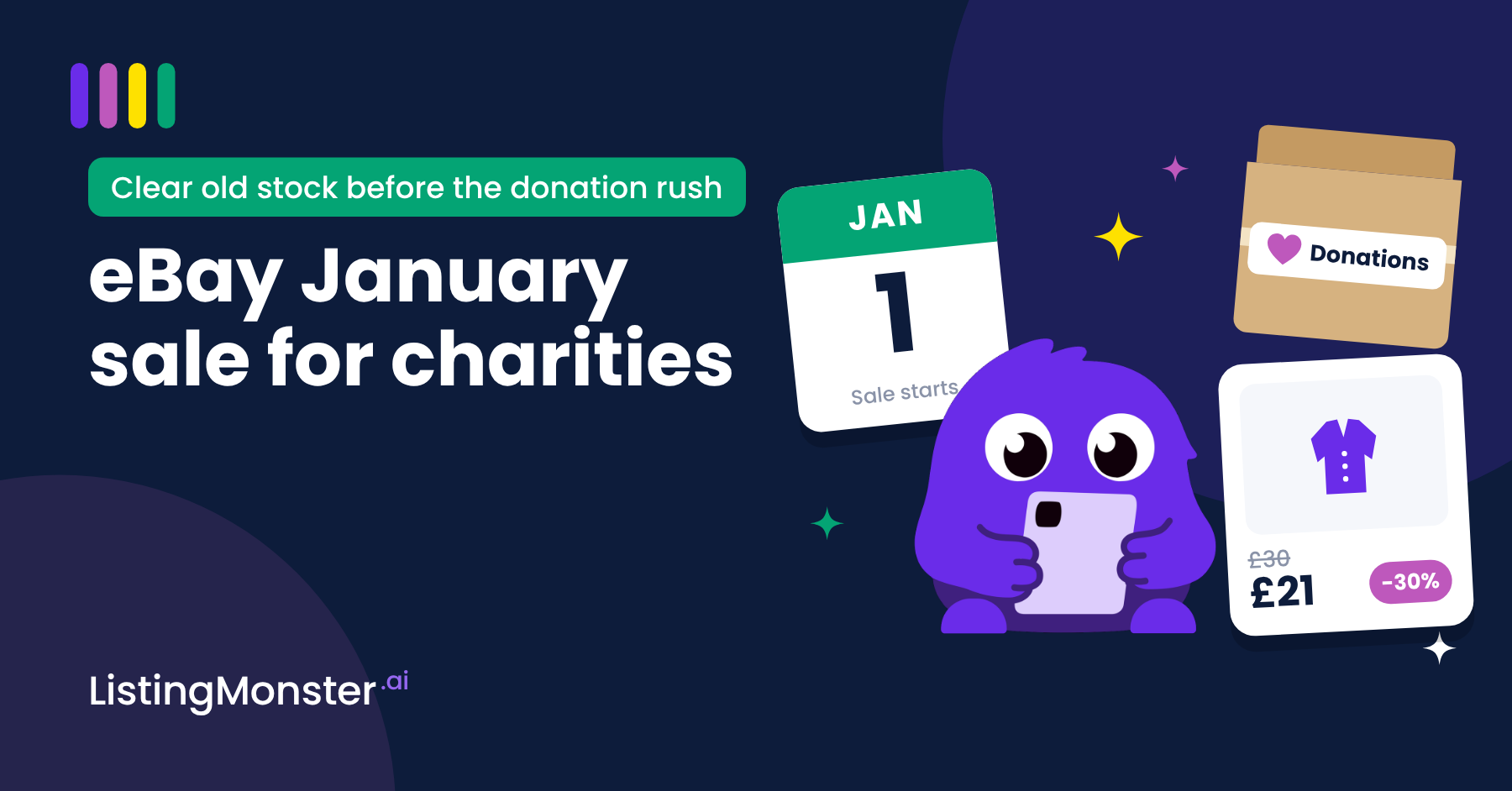
Listing Monster mascot holding a phone beside a 1 January calendar, a cardboard box labelled Donations and an eBay listing card for a coat marked down from £30 to £21, under the headline eBay January sale for charities.
Why January matters for charity eBay shops
January brings a squeeze from both sides.
- Donations go up. People declutter after Christmas and bring in unwanted gifts. Oxfam runs a January "gift amnesty" asking for exactly that.
- Space doesn't. Every item that has sat online since autumn takes up a shelf, a box or a rail that January's donations need.
- Buyers are hunting for value. Shoppers have gift money and vouchers, and they respond to clear savings.
There's a funding reason too. An item that doesn't sell raises nothing for your cause, and if it was Gift Aided, it raises no Gift Aid either. A January sale turns that idle stock into money for your mission.
What's different when a charity runs an eBay sale
Most eBay sale guides are written for traders. Three things change for a charity.
- You have the full toolkit. Charities sell through an eBay business account registered as a charity seller. That gives you access to Discounts Manager, which private sellers can't use.
- Your fees are different. Registered charity sellers pay final value fees at a special charity rate. Check your current rate in Seller Hub before you set discount depths.
- Your stock didn't cost anything, but it isn't free to keep. Donated stock has no purchase price. Its real cost is the space it takes up, the volunteer time spent managing it, and the money and Gift Aid it isn't raising while it sits unsold.
That third point changes how you set discounts. A trader asks "how low can I go and still make a profit?" A charity should ask "what price clears this item while it can still raise good money?"
Step 1: find your old stock and set your discounts
Do this in early December, before you build any sale.
Sort your listings by age
- In Seller Hub, open Listings, then Active.
- Sort by start date so the oldest listings come first.
- Note watchers and views. Items with watchers are your quickest wins.
- Group listings into the age bands below.
Match each age band to a discount
- Under 30 days: keep it out of the sale. It's still fresh.
- 30 to 60 days: 10 to 15% off.
- 60 to 90 days: 20 to 25% off.
- Over 90 days: 30% off, or refresh the listing.
A worked example. A donated wool coat was listed at £30 in October and Gift Aided by the donor. It hasn't sold.
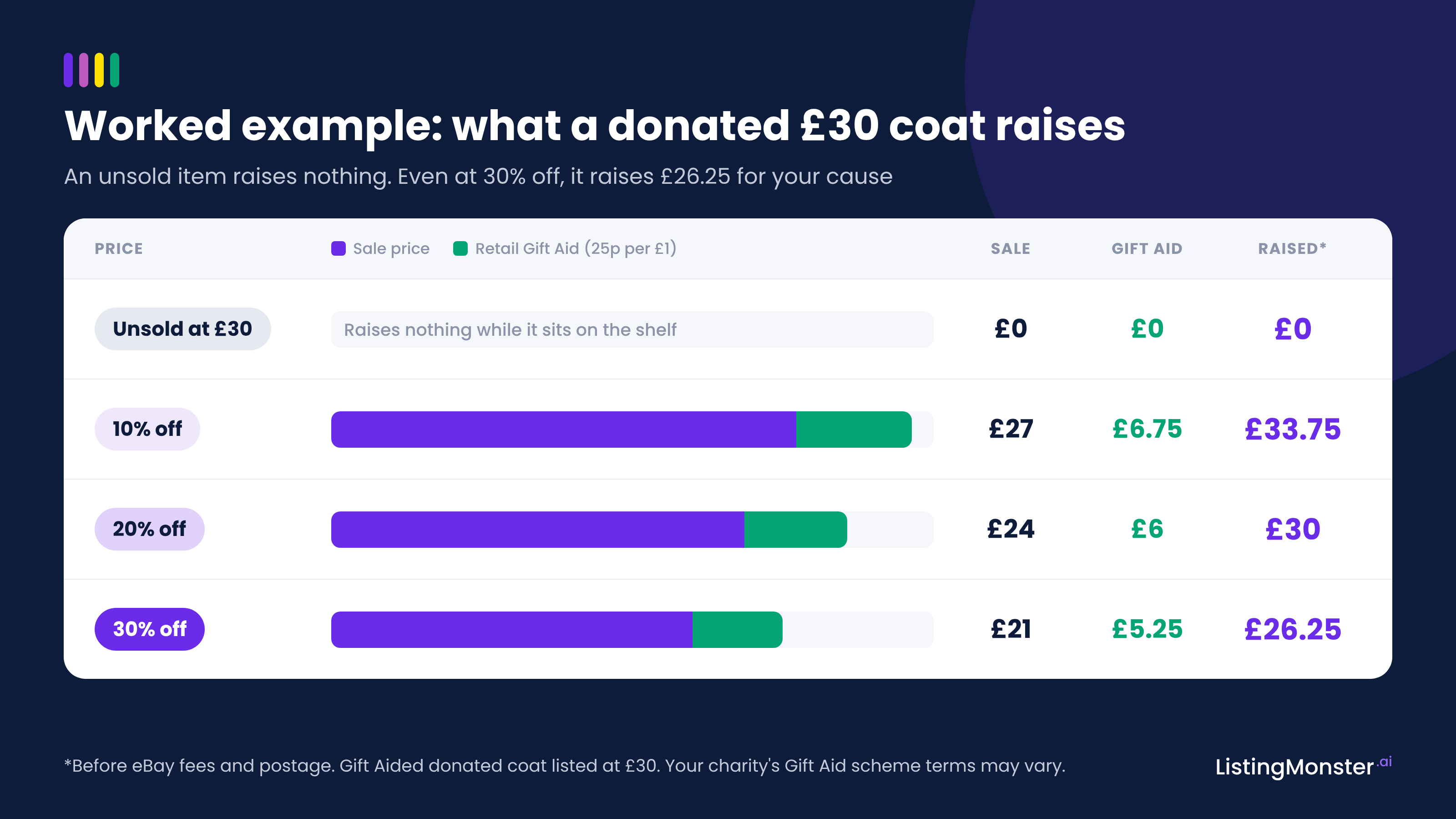
Bar chart of what a Gift Aided donated coat listed at £30 raises: unsold raises £0; 10% off sells for £27 plus £6.75 Gift Aid, £33.75; 20% off £24 plus £6, £30; 30% off £21 plus £5.25, £26.25, before eBay fees and postage
Left at £30 and unsold, it raises £0 and no Gift Aid. At 30% off it sells for £21, and Retail Gift Aid adds 25p for every £1, so £5.25 more. That's £26.25 for your cause, before fees and postage, plus a free shelf for January's donations.
How to set up an eBay sale event before the 14-day cut-off
An eBay sale event shows a was/now price with a strikethrough in search results. It's the most visible way to clear old stock.
Check the 14-day rule
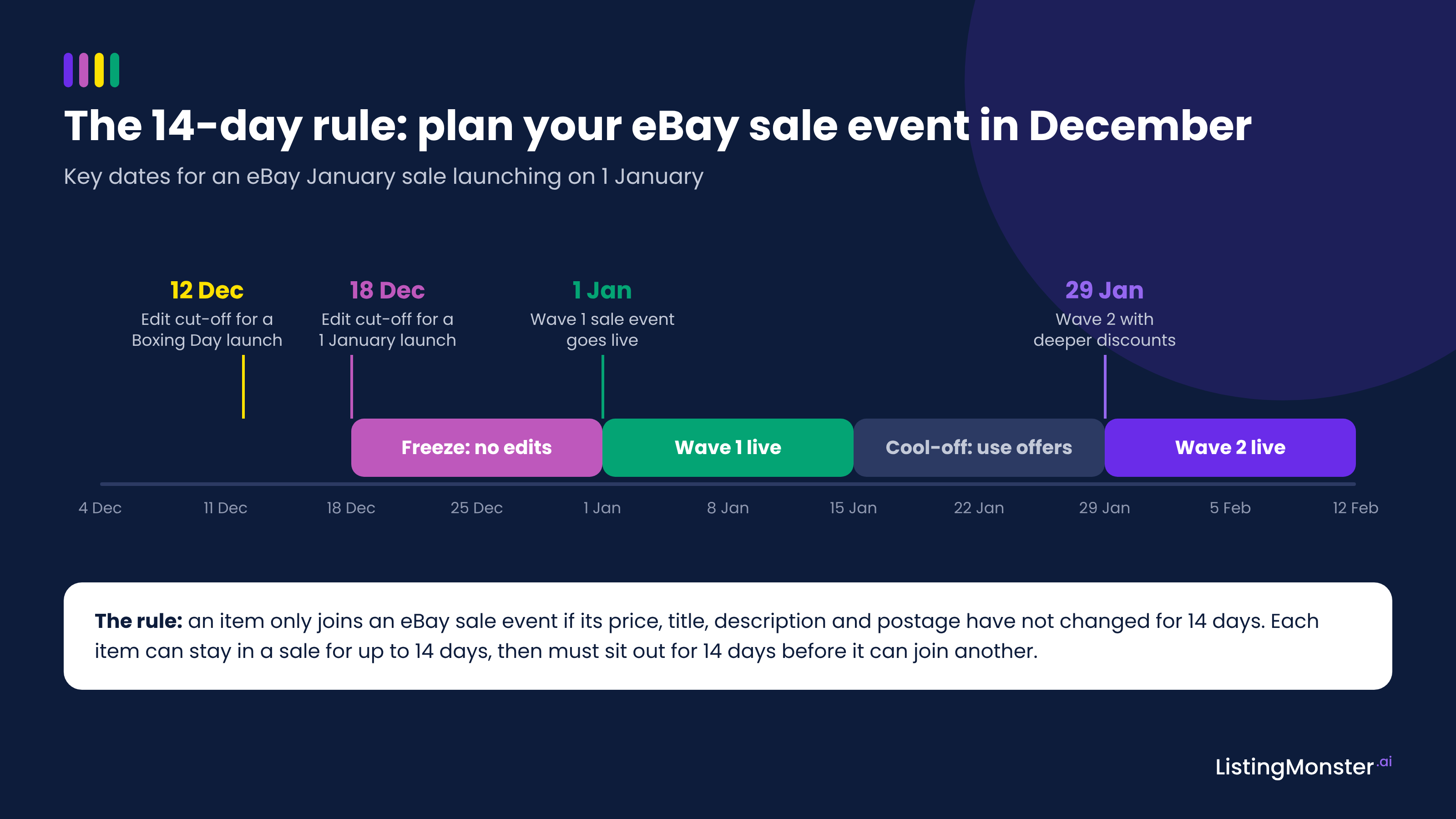
An item only qualifies if its price, title, description and postage have stayed the same for at least 14 days before the sale starts. Edit any of those in that window and eBay marks the item "SKIPPED:price".
For a 1 January launch, finish all edits to sale stock by 18 December. For a Boxing Day launch, finish by 12 December. Tell every volunteer who edits listings about this date.
Timeline from 4 December to 12 February: edit cut-off 12 December for a Boxing Day launch, listing freeze 18 to 31 December, wave 1 sale event 1 to 14 January, cool-off using offers 15 to 28 January, wave 2 from 29 January.
Set up the sale event
- In Seller Hub, go to Marketing, then Discounts, and create a Sale event.
- Choose a percentage off or a fixed amount off each item.
- Add stock by hand, in bulk by item ID or SKU, or with rules by category, price range or condition. Create one sale event for each age band so each band gets its own discount.
- Name the sale and add a description and image. A clear cause-led name works well, for example "January clear-out: 25% off coats, every sale supports our hospice".
- Set your dates. You can schedule up to six months ahead, so build it before Christmas when the team is around.
- Launch, then check for any "SKIPPED:price" items.
Plan around the rules
- Each item can be in a sale for up to 14 days, then must sit out for 14 days.
- A listing can only be in one active sale at a time.
- Only fixed-price Buy It Now listings qualify, not auctions.
- If a sale item also accepts Best Offers, eBay won't auto-respond. Someone will need to review each offer.
- Daily activation limits depend on your eBay Shop level: 250 listings for Basic, 2,500 for Featured and 5,000 for Anchor.
Run it in two waves. Run wave one from 1 to 14 January. Then run wave two from 29 January with deeper discounts on anything left.
Use eBay's other tools to clear old stock
A sale event gets attention. These tools turn it into more sales.
Order discounts: sell more per parcel
Most donated stock is one of a kind, so multi-buy, which only works on multi-quantity listings, won't do much. An order discount works across different items.
- In Seller Hub, go to Marketing, then Discounts, and create an Order discount.
- Choose the objective of clearing older stock.
- Pick an offer, for example "Buy 2 items, get 10% off" or "Save £5 when you spend £40".
- Select items by hand or with category and price rules.
- Add a name, duration, description and image, then launch.
This suits books, media, kids' clothing and bric-a-brac, where buyers often buy several items. Two items in one parcel also means less packing time for volunteers.
Coded coupons: bring December buyers back
- In Seller Hub, go to Marketing, then Discounts, and create a Coded coupon.
- Set the code, the discount, a minimum spend and an end date.
- Point it at your oldest stock.
- Use "Print a coded coupon note" in the Orders tab and slip one into every December parcel with a thank-you note.
Coupons can stack with sale events, and some coupon features need an eBay Shop subscription.
Offers to interested buyers: the quickest wins
- In Seller Hub, open Listings, then Active, and apply the Send offers - eligible filter.
- Select the listings and choose Send offers.
- Set a discount of at least 5%. In January, 10 to 15% gets more attention.
- Turn on automated offers so new watchers get the offer too.
Offers last 96 hours. With an eBay Shop subscription, you can automate offers across your stock from the Marketing tab for up to 150 days.
Promoted Listings: only where the sums work
Promoted Listings moves items up the search results. With the general strategy you only pay if an item sells within 30 days of an ad click.
- In Seller Hub, open Advertising, select Create new campaign, then Promote your listings and General.
- Choose Add listings by rule and set days on site to 60 or more.
- Set a modest fixed ad rate, then name, date and launch the campaign.
Every pound spent on ads is a pound that doesn't reach your cause, so keep the rate low and only promote stock that needs the push.
Refresh listings that have gone stale
For items with no watchers after 60 days or more, end the listing and relist it with Sell similar, changing the main photo, title or price. The Reseller Handbook 2026 reports a 10 to 20% sell-through boost on stale stock from refreshing. Don't refresh listings with watchers, as you'll lose them.
Make your January sale work for volunteers
A plan only works if the people running it can follow it. Keep it simple.
- Put one person in charge of building and scheduling the sale events.
- Print the freeze date and put it where listing volunteers work: "No edits to listings in the sale after 18 December."
- Set a 10-minute daily check for offers, Best Offers on sale items and questions from buyers.
- Keep new donations separate. List January's new stock at full price, outside the sale.
- Agree an end point. Decide now what happens to anything still unsold after wave two, for example the shop floor, a bulk lot or textile recycling.
Your charity January timeline
- Early December: sort listings by age and agree discounts.
- By 18 December: finish all edits to sale stock. Add coupon notes to December parcels.
- Before Christmas: schedule wave one and your order discount.
- 1 January: wave one goes live. Launch Promoted Listings on stock 60 days old or more.
- 1 to 14 January: send offers to watchers daily.
- 15 to 28 January: refresh stale listings and keep sending offers.
- 29 January: wave two goes live with deeper discounts.
- Mid-February: move anything still unsold off eBay.
How to tell if your January sale worked
Track these against December:
- Sell-through rate: the share of sale items that sold.
- Funds raised from sale stock: the money raised plus the Gift Aid unlocked on Gift Aided items.
- Space freed: how many items left the stockroom before January's donations arrived.
You can see results for each discount and campaign in the Seller Hub Marketing and Advertising tabs.
FAQs
Can charities use eBay sale events?
Yes. Registered charity sellers on eBay UK use a business account, which gives access to Discounts Manager. That includes sale events, order discounts, coded coupons and automated offers. Some features, such as coupons and rule-based automated offers, need an eBay Shop subscription. Charity sellers also pay final value fees at a special charity rate.
Does discounting reduce Retail Gift Aid?
Yes, in proportion. Retail Gift Aid adds 25p for every £1 a Gift Aided item sells for, so a lower price means less Gift Aid. But an item that never sells raises no Gift Aid at all. Selling a £30 item at £21 unlocks £5.25 of Gift Aid that would otherwise be lost.
When should a charity start planning an eBay January sale?
Start in early December. An eBay sale event only includes items whose price, title, description and postage haven't changed for 14 days. For a 1 January launch, all edits must be finished by 18 December. Schedule the sale before the Christmas break so it goes live even if the team is away.
How long can an eBay sale event run?
Each item can stay in a sale for a maximum of 14 days. It then has to sit out for 14 days before it can join another. To cover the whole of January, run two waves: one from 1 to 14 January, then a deeper discount from 29 January on anything still unsold.
What should we do with stock that still doesn't sell?
Set a clear end point. If an item hasn't sold after two sale waves and a listing refresh, take it off eBay by mid-February. Move it to a shop floor, group similar items into a bulk lot, or send textiles for recycling. This frees space and volunteer time for stock that will sell.